Land on the right site
Filter with keywords—or let AI understand what you need—so you spend less time bouncing between tabs.
LinkWord · Find great sites and reads
Search when you know what you want—or scroll on: articles, tools, and picks are just below.
You don’t need the whole site at once. Start wherever feels natural.
Pick a category and engine, then search. In-site directory and AI directory are under Common; external sites open in a new tab unless configured otherwise.
LinkWord
LinkWord (linkwordx.site) is an AI directory and navigation-style site: it combines an AI tools directory, website recommendations, tech news, curated articles, and a large set of small online utilities—so you can discover great bookmarks and jump to what you need with search.
Search the directory from the home page, browse categories, read the latest articles, or open the toolbox for privacy-friendly, in-browser helpers for links, text, and data—no install or login required.
A few crowd favorites live here; the full toolbox has 50+ more, all running locally in your browser.
Add or inspect utm_source, utm_medium, utm_campaign, and more for campaign tracking.
Create QR codes locally: size and colors, PNG/SVG export, WiFi/vCard templates, optional center logo.
Format or minify JSON, or convert between JSON and YAML.
OpenAI models via tiktoken; China models via common heuristics and cl100k/o200k proxies for rough cost and context planning.
Find sites, catch up with reads, or knock out a quick task in the browser. It all works best with the search box above.
Filter with keywords—or let AI understand what you need—so you spend less time bouncing between tabs.
Tech, AI, and product pieces for a commute scroll or a longer weekend read.
Links, text, data, color helpers, and more—open, use, close. No account required.
If you already know what you need, head to directory search. If you’d rather read or play with a tool, the doors below are open.
Not sure what to search yet? Start with what we're featuring, then peek at what others have been opening lately—you might find your next favorite bookmark.
Sorted by clicks
 GitHub5 clicks2
 dverso Laundry — Background Removal3 clicks3CChuangge Toolbox — A collection of free small tools, ready to use by simply opening the webpage, with files processed as much as3 clicks4
 Railway2 clicks5
 Gamma — AI Presentations & Website Builder2 clicks6
 Claude2 clicks7
 Snyk2 clicks8
 Yingjiesheng2 clicks9
 GitLab1 clicks10
 Bitbucket1 clicks
HN picks today: Paseo unifies multiple coding agents into one interface; nbd-vram uses GPU VRAM as Linux swap space; Clor enables background execution for coding agents.

Today's three tools tackle text template management, automated deep research, and dependency security. Textile is a macOS text snippet composer, Dataroom autonomously builds research datarooms on local GPUs, and DepsGuard hardens your package manager configs before deployment.

Today's three picks: a 1-bit image generation model that runs on MacBooks, an Obsidian-style live preview web editor, and a terminal task manager built for coding agents.
Top 5 preview per category—chat, image, and video.
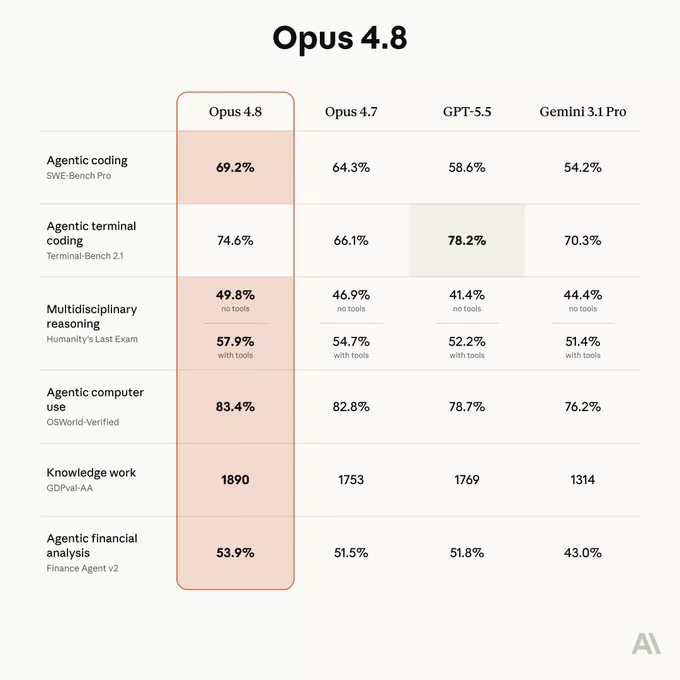
| Rank | Model | Provider | ScoreEditorial composite score; higher ranks higher | Context (K)Context window size (thousand tokens) | Input $Input token price (USD per 1M tokens) | Output $Output token price (USD per 1M tokens) | MMLUMassive Multitask Language Understanding accuracy (%) | HumanEvalCode generation benchmark pass rate (%) | EloArena Elo from human preference battles; higher is stronger |
|---|---|---|---|---|---|---|---|---|---|
| 1 | G GPT-5.5 | — | 98.0 | 1050 | 5 | 30 | 91.50 | 91.40 | 1420 |
| 2 | G Gemini 3.5 Pro | Google DeepMind | 96.0 | 1000 | 1.50 | 9 | 91 | 89.50 | 1400 |
| 3 | C Claude Opus 4.8 | — | 95.0 | 1000 | 10 | 50 | — | — | — |
| 4 | C Claude Opus 4.7 | — | 93.0 | 1000 | 5 | 25 | 91 | 92.50 | 1400 |
| 5 | G Gemini 3.5 Flash | — | 90.0 | 1049 | 1.50 | 9 | 92.30 | 86.80 | 1370 |
Fresh articles and takes—subscribe with RSS if you want updates in your reader.